Configure Amazon CloudWatch connections with a Grepr integration
To use Amazon CloudWatch as a destination for your Grepr pipelines, use the Grepr OpenTelemetry integration to ingest logs into your Grepr pipelines for processing and send the processed logs to CloudWatch. The OpenTelemetry integration supports receiving logs from any collector that supports OTLP/HTTP, such as the OpenTelemetry Collector and Fluent Bit, and sending the processed logs to a CloudWatch log group using the CloudWatch OTLP/HTTP endpoint.
You can use the Grepr UI or REST API to create an OpenTelemetry integration configured for CloudWatch. To learn how to create an OpenTelemetry integration in the Grepr UI and configure collectors to send logs to Grepr, see Use an OpenTelemetry integration with CloudWatch in a Grepr pipeline.
Although this page describes using an integration to create a pipeline for sourcing and sending data with a single observability platform, your pipelines can use multiple integrations to source and sink data for different platforms. For example, you can create a pipeline with a Datadog integration that’s used to source data from Datadog agents, and a Splunk integration and sink that sends the pipeline output to Splunk.
Requirements
Connecting Grepr to CloudWatch uses CloudWatch’s OTLP/HTTP endpoint, and requires the following:
- The CloudWatch OTLP logs endpoint for your region.
- An Amazon CloudWatch log group and log stream. The log group must have bearer token authentication enabled.
- An AWS IAM user with
logs:PutLogEventspermission on the CloudWatch log group and a bearer token to authenticate the user to CloudWatch.
To learn more about the CloudWatch support for OTLP/HTTP, see OTLP Endpoints .
To learn more about creating an IAM user, bearer token, and the log group and stream for CloudWatch’s OTLP/HTTP endpoint, see Setting up bearer token authentication .
Use an OpenTelemetry integration with CloudWatch in a Grepr pipeline
Step 1: Create an OpenTelemetry integration
To create an OpenTelemetry integration configured for CloudWatch in the Grepr UI:
-
Go to the Integrations page in the Grepr UI and click Add new next to Observability Vendors.
-
In the Add Observability Vendor dialog:
-
In the Type menu, select Open Telemetry.
-
In the Name field, enter a name for the integration. Grepr recommends naming it descriptively so it’s easy to identify. For example,
cloudwatch-prod-logs. -
In the Base Endpoint URL field, enter
https://logs.<region>.amazonaws.com, replacing<region>with your AWS region. -
Click Add Header and add the following three headers. For the
Authorizationheader, select the lock icon to securely store the token.- Header Name:
Authorization. Header Value:Bearer <bearer-token>. Replace<bearer-token>with the bearer token for the CloudWatch IAM user. - Header Name:
x-aws-log-group. Header Value: the name of your CloudWatch log group. - Header Name:
x-aws-log-stream. Header Value: the name of your CloudWatch log stream.
To send logs from a single integration to dynamically chosen log groups or log streams based on log content, configure
x-aws-log-grouporx-aws-log-streamas attribute-sourced headers instead of static values. - Header Name:
-
In the Output encoding menu, select JSON.
-
-
Click Create.
-
Save the
GREPR TOKENdisplayed in the confirmation dialog securely.Optional: Grant team access to the integration
When you have teams in your Grepr organization, you can grant access to the integration to one or more of those teams. To configure team access when you create or edit an integration:
-
In the Grant Team Access section, click the plus sign icon (+).
-
Select the team or teams that should be granted access to the integration.
-
Click Create.
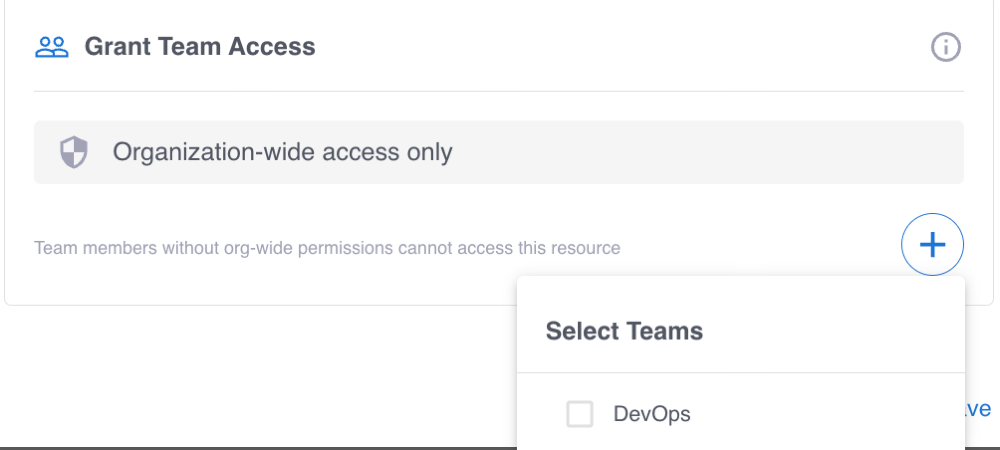
To learn more, see Manage teams in the Grepr platform and Permissions in the Grepr platform.
-
CloudWatch’s OTLP endpoint determines the destination log group and log stream from the x-aws-log-group and x-aws-log-stream request headers. If you configure static values for these headers, your Grepr integration sends every log event to the same log group and log stream.
To route log events from your integration to dynamically chosen CloudWatch log groups or log streams based on attributes included in the events, select From Attribute and enter the Attribute Path value when you configure the x-aws-log-group or x-aws-log-stream headers. Grepr groups log events that share the same attribute value into the same outbound request, sets the header to that value, and forwards the events to CloudWatch.
For example, to send log events from a Kubernetes namespace to a log stream named after the namespace:
- In the Grepr OpenTelemetry integration, edit the
x-aws-log-streamheader. - In the Source menu, select From Attribute.
- In the Attribute Path field, enter the path to the attribute that holds the namespace. For example,
kubernetes.namespace.name. - Save the header.
When a log event is missing the configured attribute, Grepr still delivers the event to the CloudWatch endpoint, but without the x-aws-log-stream header. Because the CloudWatch OTLP endpoint relies on this header to determine the destination log stream, ensure every log event routed through the integration contains the required attribute, or use a static value for x-aws-log-stream.
Step 2: Add a source to your pipeline
To add a source to your pipeline that uses the OpenTelemetry integration:
- In the Grepr UI, go to the details page of an existing pipeline or create a new pipeline from the homepage.
- In the left-hand navigation menu, click Sources.
- In the Add source dialog, select your OpenTelemetry integration in the Source menu.
- Click Submit.
Step 3: Configure log forwarding to Grepr
To send data to Grepr, you configure your collector or agent to send it to the ingestion URL for your Grepr integration, rather than to your observability vendor’s platform. To find the ingestion URL when using the Grepr UI to configure your pipeline, go to the details page for the pipeline, click Sources in the left pane, and copy the Ingest URL.

If you connect to Grepr through AWS PrivateLink, copy the private ingestion URL and use it in place of the public ingestion URL. To learn more about sending data to Grepr over AWS PrivateLink, see Securely forward observability data to Grepr with AWS PrivateLink.
When you use the API, you can construct the ingestion URL using the following format:
https://<integration-id>-<org-id>.ingest.grepr.ai/otlp
Replace <integration-id> with the identifier of the vendor integration used by your pipeline and replace <org-id> with the identifier for your organization.
To use the PrivateLink endpoint service, insert .private after the ingest host segment.
Although all sources created from the same integration share the same ingestion URL, you can use a single integration to create sources for multiple pipelines. The Grepr platform ensures events are routed to the correct pipelines.
Authenticate by sending the Grepr token in the x-grepr-token header. Replace <grepr-token> in the examples below with the token you saved after creating the OpenTelemetry integration in Step 1.
To see more information and configuration examples, select the tab for your preferred log collector:
OpenTelemetry Collector
The OpenTelemetry Collector can send logs to Grepr using the otlphttp exporter.
To configure the OpenTelemetry Collector to send logs to Grepr’s ingestion endpoint, update your collector configuration (collector.yaml):
exporters:
  otlphttp:
    endpoint: <ingestion-url>
    headers:
      x-grepr-token: <grepr-token>

service:
  pipelines:
    logs:
      receivers: [otlp]
      processors: [batch]
      exporters: [otlphttp]
Replace <ingestion-url> with the full ingestion URL provided by the Grepr UI, and <grepr-token> with your Grepr token.
To learn more about OpenTelemetry Collector configuration, see the OpenTelemetry Collector documentation .