Remember past investigations
Without memory, every investigation starts from nothing. An agent that diagnosed a problem last week reaches the same conclusion the same slow way this week, and nobody learns that the problem has now happened five times.
Memory changes that. An agent with memory enabled records what it concluded when it reaches a diagnosis, recognizes when a later investigation reaches the same conclusion and counts the recurrence, and searches those records at the start of a new investigation to find out whether it has seen this before.
Both halves show up in the investigation’s tool calls. A memory search runs near the start, before the agent has looked at anything else, and the record is written at the end, when it has a diagnosis.
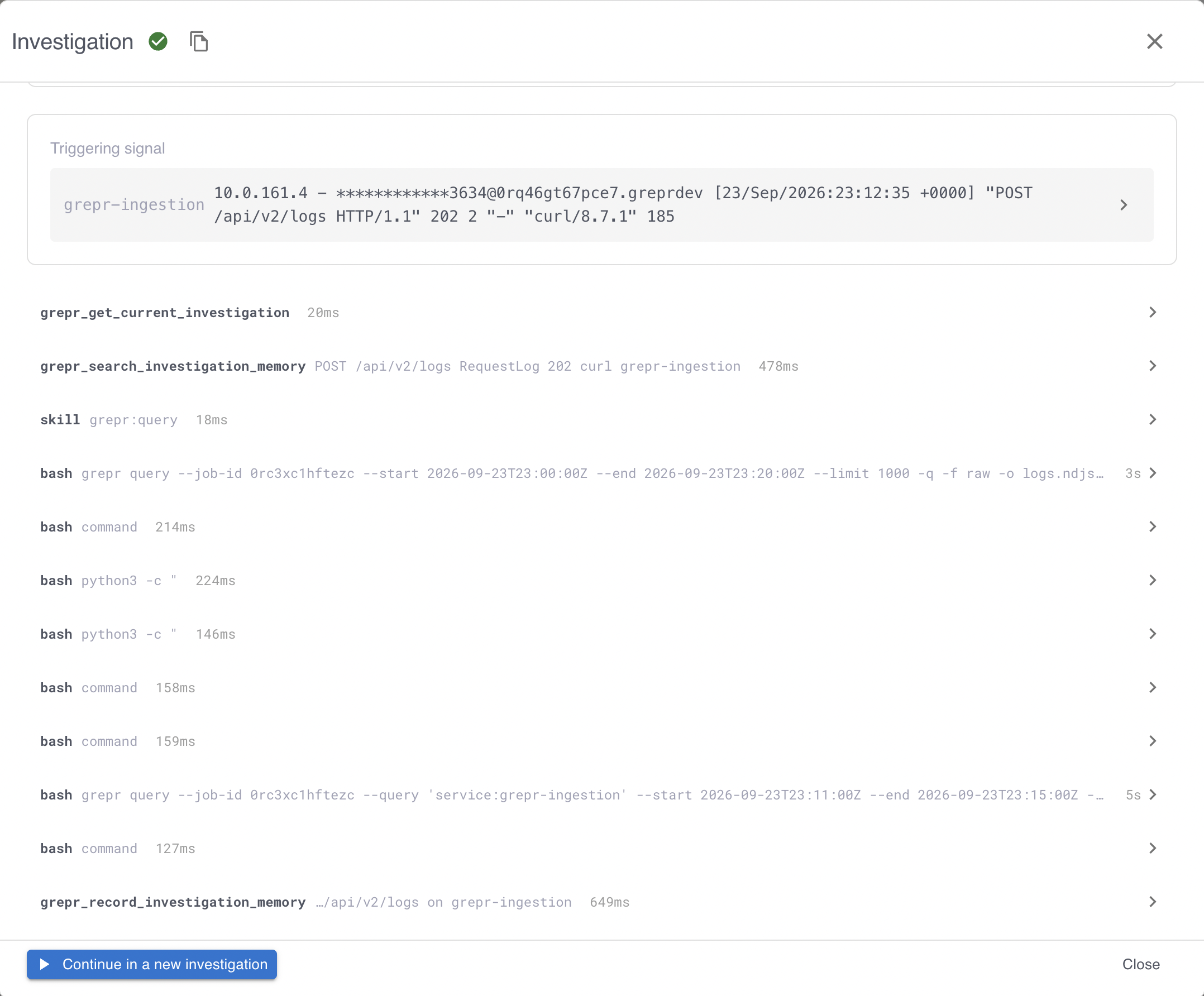
The agent decides what to record and whether something is a recurrence. Grepr does not extract conclusions on its behalf or merge records by similarity, because the investigating agent is the only thing that saw the evidence.
Every agent records memories unless you turn memory off, and every agent can search the memories your organization’s agents recorded. Searching by meaning needs a store, which is optional. See Add semantic search.
What an agent records
An agent records at most one memory per investigation, written when it reaches a diagnosis rather than after the fact. Each memory holds:
| Field | What it holds |
|---|---|
| Title | A short name for the problem. |
| Symptoms | What was observed. |
| Root cause | What the agent concluded was responsible. |
| Root cause confidence | Whether the cause is confirmed, suspected, or unknown. |
| Ruled out | Causes the agent checked and eliminated, so a later investigation does not repeat that work. |
| Resolution | What resolved it, or what was attempted. |
| Significance | How much the conclusion matters. See Significance. |
| Entity tags | The services, pipelines, and environments the memory is about. See Entity tags. |
| Recurrence count | How many investigations reached this same conclusion. |
An agent can correct its own memory for an investigation while that investigation is running, so an early diagnosis it later disproves does not stay on the record. Correcting a memory does not count as a new recurrence.
Significance
Significance is how an agent classifies what it found, and a search can filter on it:
| Significance | Meaning |
|---|---|
| Incident | A real problem was identified. |
| Observation | Not a problem, but a conclusion worth keeping. |
| Inconclusive | The agent could not determine whether there was a problem. |
| Benign | Triaged as no problem. |
Text and timeline searches find benign memories like any other memory, so an agent can notice that a given service has been triaged as benign many times. A semantic search finds a benign memory only when the agent that recorded it made it searchable by meaning. A search that is looking only for real problems can list the significances it wants and leave benign out.
Add semantic search
Without a store, an agent’s memories are found by text and timeline searches. A store adds semantic search, which finds memories by meaning. A store needs somewhere to keep its search index and a model to build that index with, so there are three things to set up.
Step 1: Create a vector index integration
- On the Integrations page, next to the S3 Vector Index section heading, click Add new.
- In the Add Vector Index dialog, enter a Name and the number of Dimensions the embedding model you plan to use produces, then click Create.
The dimensions must match the model’s output, so choose the embedding model first and use its dimension count. An index’s dimensions are fixed after creation.
Step 2: Create an embedding integration
Memory embeds each record with a model from an LLM integration that provides embeddings. If you do not have one, create it before you continue. See Configure LLM provider connections with a Grepr integration.
An agent’s reasoning model and its embedding model are separate choices. An agent can reason with one integration and embed with another.
Step 3: Set the agent’s store
- On the agent’s page, go to the Memories step.
- Under Semantic search, select the Vector index integration, the Embedding credentials, and the Embedding model.
- Save the agent.
A store is the three settings together: set all of them, or clear all of them. Memories recorded before the agent had a store are found by text and timeline searches only.
When you create an agent and leave its store empty, the agent takes the store your other agents use, if exactly one store is in use among the agents that record memories and you can view both of its integrations. Otherwise the agent has no store until you set one.
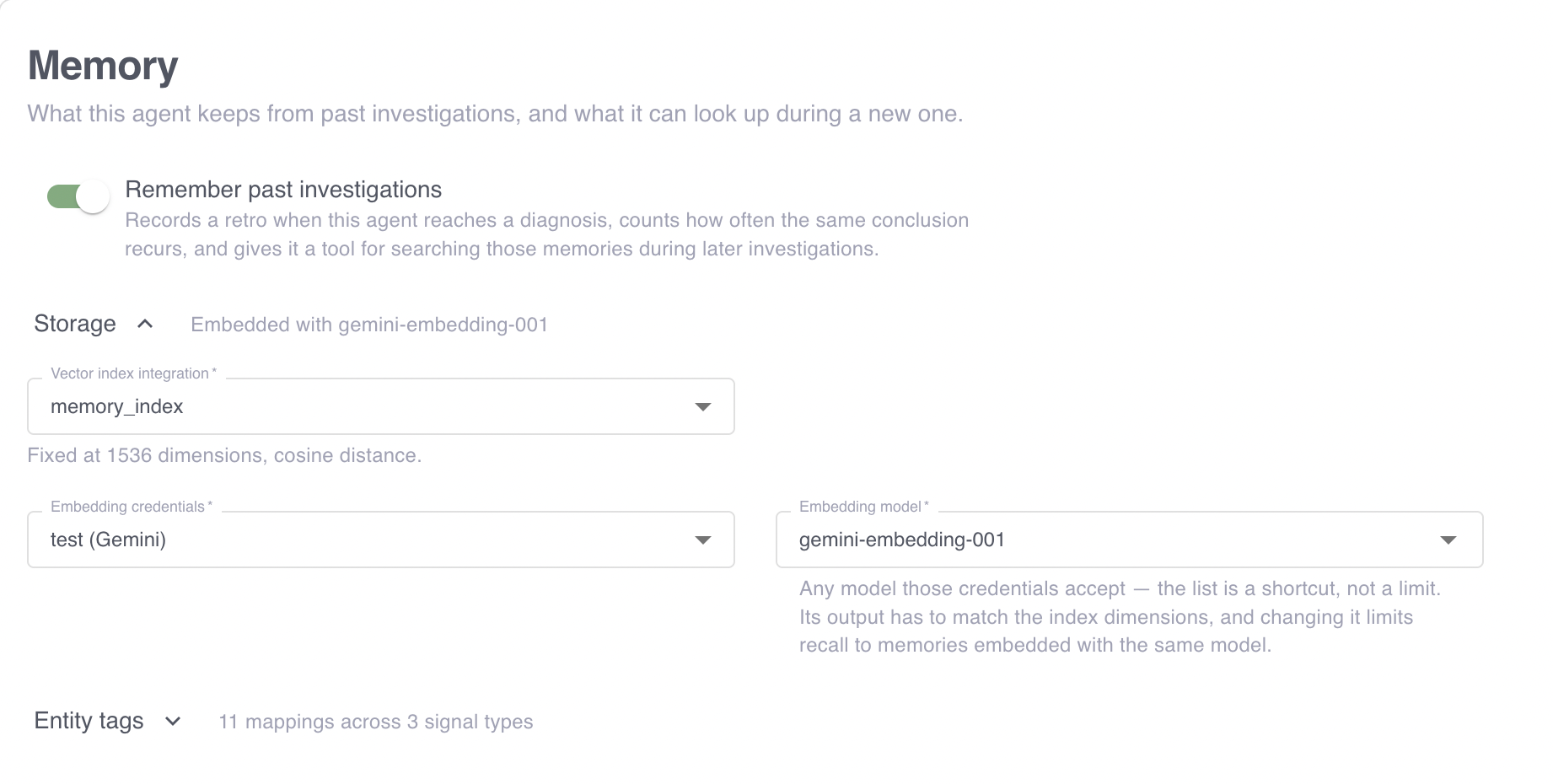
Grepr creates the search index when you create the vector index integration in Step 1, and discards the integration if the index cannot be created. Saving the agent then checks that the embedding model actually works against that index, by embedding a test value with it. So a wrong model or an unusable credential stops the save rather than surfacing later as memories that were never indexed.
Choose an embedding model and keep it
A memory is embedded with the model the agent had when it was recorded, and a query can only be compared against embeddings from the same model. Changing an agent’s embedding model therefore cuts its new memories off from the ones it already recorded, as far as searching by meaning is concerned. Treat the choice as long lived.
Using the same model across several agents does not pool their memories into one semantic search. A search by meaning always targets one agent, as described next.
How an agent searches its memory
A search runs in exactly one of three modes, and which mode fits depends on what the agent is trying to find:
| Mode | What it finds | Use it to answer |
|---|---|---|
| Semantic | Investigations whose conclusions mean something similar to the query. | Has a problem like this happened before? |
| Text | Investigations mentioning specific words, using full-text search. | Has this exact error string or identifier come up before? |
| Timeline | Investigations about given entities, ordered by time. | What has been happening to this service recently? |
Semantic search finds a past incident described in different words, which text search misses. Text search finds a literal, such as an error code or a host name, which semantic search can rank poorly. Timeline search needs entity tags rather than a query.
A semantic search needs the agent it searches to have a store, and returns nothing for an agent without one. When an agent searches without choosing a mode, Grepr uses semantic when the searched agent has a store, and text otherwise.
The modes also differ in how much they cover, which matters when you read an empty result:
- A semantic search covers one agent at a time, because a query is only comparable against embeddings made with that agent’s model. An empty semantic result means nothing similar was found within what the search could reach. It is not evidence that the agent recorded nothing similar, and it is not evidence that your organization has not seen the problem. A memory embedded with a model the agent no longer uses is unreachable until it is embedded again, and a search that cannot reach the embedding provider returns empty as well. An agent can also record a routine or benign observation without making it searchable by meaning, so a semantic search never returns it. When an empty result matters, confirm it with a text or timeline search, which read the records directly.
- A text or timeline search covers every agent in your organization by default, so it is the one to use when you want the organization’s whole history.
So to find out whether any agent has seen something, search by text or timeline, or repeat the semantic search against each agent you care about.
A result carries the memory’s title, significance, and entity tags along with its recurrence count, how long ago it was recorded, when it was last seen, and whether it is active, recent, or historical. Results are compact by default: the symptoms, root cause, ruled-out causes, and resolution come back only when the search asks for them, or when the agent reads one memory in full by its ID. Each semantic or text result also carries a score that ranks it within that search. A score orders candidates; it does not establish that a past memory is the same incident, which the agent judges from the content.
Search returns three results by default and at most 50, without pagination, and says when more matched than it returned. Narrowing by entity tags or by significance is more effective than raising the limit.
Entity tags
Entity tags are what make memories findable by the thing they are about, such as a service, a pipeline, or an environment. Each memory carries two kinds:
- Tags Grepr derives from the triggering signal, which identify the source and the signal type.
- Tags the agent adds, which name the entities it concluded the memory is about.
Grepr derives its tags using a mapping per signal type, which extracts values from the signal payload by path. The shipped mappings cover the common cases:
| Signal type | Tags derived from the signal |
|---|---|
| Log pattern | The pipeline, the pattern, and the service, environment, and Kubernetes namespace from the sample log event. |
| Webhook | The integration, and the service and host from the payload. |
| Manual | The signal type only. |
The webhook mapping reads the service and host from field names Grepr expects. If your payloads name those fields differently, add a mapping so the tags resolve. On the agent’s Memories step, under Entity tags, add a mapping for the signal type, then add each tag key with the paths to read it from. Grepr tries the paths in order and uses the first that resolves.
Consistent tag values matter more than complete ones. A service tagged checkout in some memories and checkout-svc in others splits its history in two, and a timeline search finds only half. An agent can ask a search for the tag values already in use in your organization, so an agent that checks before recording reuses existing values rather than inventing new ones.
Case doesn’t split a history: Service=Checkout and service=checkout are the same tag.
Set how an agent uses its memory
The Retrieval policy settings on the agent’s Memories step tell the agent how much to search and what to record. Grepr adds them to the agent’s instructions, so you do not restate them in the agent’s own prompt.
| Setting | What it tells the agent | Default |
|---|---|---|
| Search budget per investigation | How many memory searches to spend in one investigation, from 0 to 10. A budget of 0 tells the agent not to search. | 2 |
| Record | Which conclusions are worth a memory: Every conclusion, Non-benign only, or Reusable only, which keeps only a cause, a fix, or a pattern that is known noise under stated conditions. | Every conclusion |
| Extra guidance | Your own instructions about what this agent should or should not remember, added after the settings above. | None |
The search budget is an instruction, not a limit. Grepr does not count an agent’s searches or refuse one past the budget, and an agent can search again when a result gives it a specific reason to. A setting you leave empty or at Default follows the default, including if the default changes.
Hand an agent its related history
With the related-history digest, an investigation starts with a short list of memories related to its triggering signals, so the agent recognizes a recurring problem before it spends any of the investigation looking for it. The digest is off by default. To turn it on, on the agent’s Memories step, under Related-history digest, turn on Send related history with the trigger.
For each triggering signal, Grepr looks up memories tagged with the signal’s pattern. When the pattern has no memories in the window, Grepr looks up memories tagged with the signal’s service instead. The lookup covers every agent in your organization and keeps memories last seen within the window, so a problem first recorded long ago that keeps recurring still appears.
| Setting | What it controls | Default |
|---|---|---|
| Window (days) | How long ago a memory can have last been seen and still be listed, from 1 to 90 days. | 14 |
| Max items | How many memories the digest lists in total, from 1 to 20, shared across the triggering signals. | 5 |
Each line of the digest names the memory’s ID, whether the agent recorded it, its significance and confidence, how often it recurred, when it was last seen, and whether it matched by pattern or by service. A memory a person edited or marked wrong says so.
The agent treats a digest that checked every triggering signal as its initial memory check, and searches again only for something the digest did not answer, such as older history. When the lookup could not check everything, the agent is told so and searches memory itself, unless its search budget is 0. That happens when the lookup fails, when a signal has no pattern or service tag to look up, when the trigger carries more than 10 tagged signals, or when more memories matched than Max items allows.
The agent reads a listed memory in full before it links its investigation to that memory. A continuation of an earlier investigation does not get a digest, and searches memory itself instead.
Who can read and write memories
- Reads are organization-wide. Any agent can search any other agent’s memories in your organization, including an agent that records none of its own. Operational history is only useful shared, so an agent investigating a service finds what another agent concluded about the same service. Permission is uniform across the modes, but coverage is not: a semantic search still examines one agent at a time. See How an agent searches its memory.
- Writes are owner-only. A memory can be written or corrected only by the agent that ran the investigation, so one agent cannot overwrite another’s conclusions.
When an agent finds that a past memory describes what it is now seeing, it links its investigation to that memory, which raises the recurrence count rather than creating a near-duplicate record. Each contributing investigation counts once.
Memories outlive the agent that wrote them. Deleting an agent leaves its memories searchable by your other agents.
Review memories in the UI
The Memories page in the Agents area lists every agent’s memories in your organization, most recently seen first. Filter it by any entity tag, such as a service or an environment, and by agent, significance, verdict, or text, then open a memory to read it in full with links to the investigations it came from. An agent’s Memories step shows the same list below its memory settings, fixed to that agent.
With permission to edit integrations, you can also correct what an agent concluded:
- Edit a memory’s title, symptoms, root cause and confidence, ruled-out causes, resolution, significance, or tags. Tags derived from the triggering signal cannot be changed. An edit applies only to the version of the memory you opened, so a change a person or an agent made after you opened it is never overwritten without you seeing it first.
- Mark it wrong with a note explaining why. The memory stays searchable, and agents that find it are told a person rejected its conclusion, so they treat its root cause as ruled out rather than as a match.
- Delete it. Deleting removes the memory and its recurrence links, and the investigations keep their transcripts. If the investigation that recorded it records again, that is a new memory.
Agents see when a person edited a memory or marked it wrong. A later investigation that finds the same incident in a memory you edited counts as a recurrence but does not change its text. An agent does not link an investigation to a memory you marked wrong, and records a memory of its own instead. An investigation whose own memory you edited or marked wrong keeps that memory, so the agent cannot remove your review by linking the investigation to another memory. The investigation that recorded a memory can still update it, because the agent that ran the investigation owns it. An update replaces the text you reviewed, but the memory still shows as edited or marked wrong, and the agent is told that your edit or verdict remains. Agents treat the root cause of a memory you marked wrong as ruled out until you clear the verdict. For a memory you edited, agents are told when you edited it, and that the investigation that recorded it might have updated the text since then.
Search memories from the CLI
The Grepr CLI searches the same memories an agent does, so you can read what your agents have concluded from a terminal or a script as well as on the Memories page.
# Find investigations mentioning a literal string
grepr investigation:memory:search --mode text --query "connection refused" --limit 5

# Find investigations whose conclusions are similar in meaning
grepr investigation:memory:search --mode semantic --agent-id <agent-id> --query "intermittent ingestion failures"

# See what has been happening to one service lately
grepr investigation:memory:search --mode timeline --entity-tag entity:service=checkout

# Read one memory in full, with the investigations linked to it as recurrences
grepr investigation:memory:get <memory-id>
A semantic search needs an agent id, because a query can only be compared inside the index that agent embeds into. Text and timeline searches cover every agent in your organization by default. Timeline searches need at least one entity tag.
Search results are compact by default. To read a result’s symptoms, root cause, ruled-out causes, and resolution, pass its investigation id to investigation:memory:get, which also lists the most recent investigations linked to it.
To learn more about the CLI, see The Grepr CLI.