Extend agents with skills
A skill is a directory of instructions that an agent loads only when the task it covers comes up. Grepr ships a set of skills, and you can write your own for the procedures your organization follows.
Skills exist because an agent’s system prompt is read at the start of every investigation, so anything you put there costs tokens on every run whether it is relevant or not. Guidance that applies to one kind of task belongs in a skill. A skill can also carry the tools its task needs, which is why enabling one is often how you grant a capability rather than pinning the tool yourself.
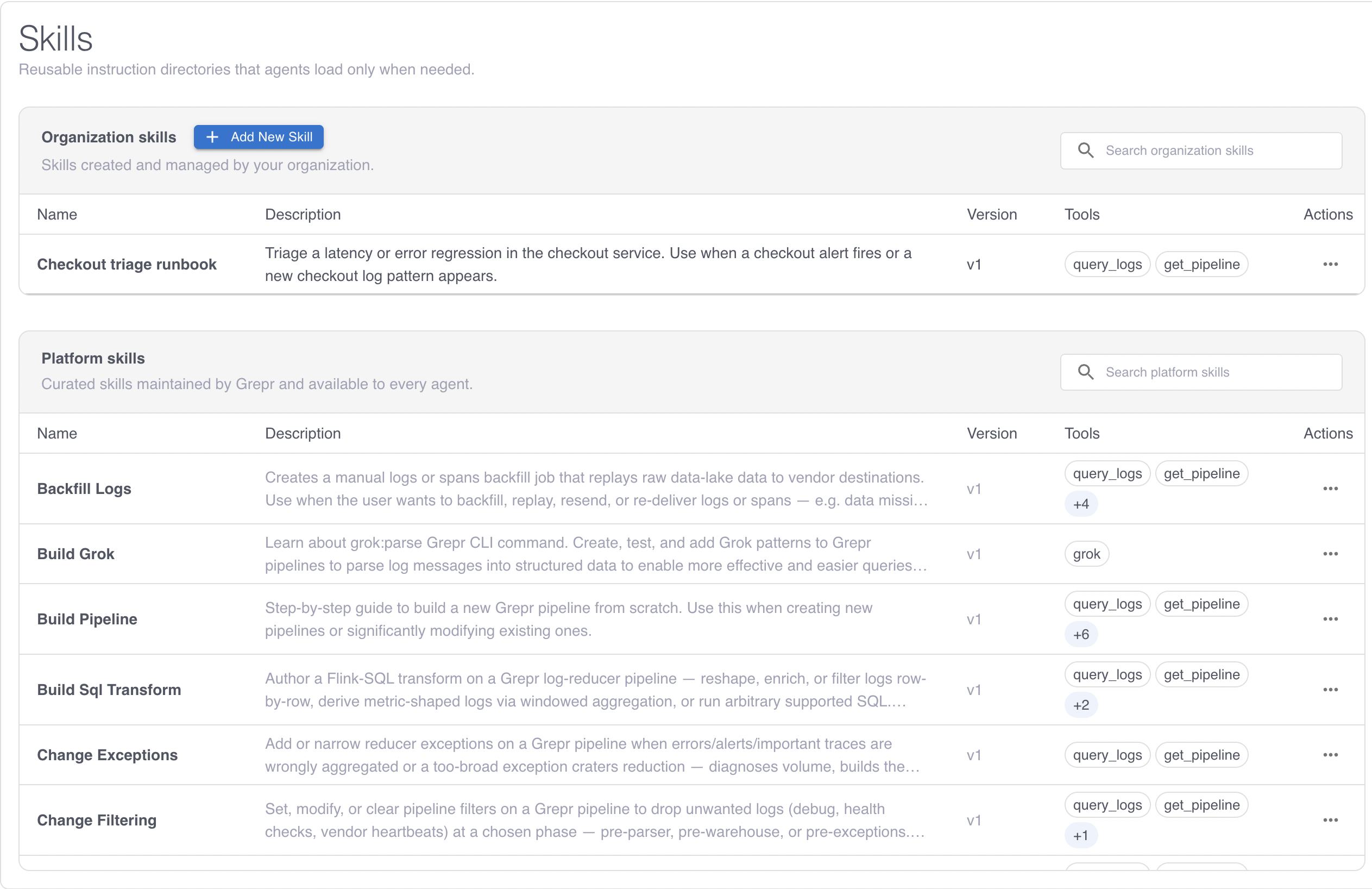
Skills are on the Skills page, which shares the left rail with Agents.
Skill scopes
| Scope | Where it comes from | Who can change it |
|---|---|---|
| Platform | Maintained by Grepr and available to every agent. | Read only. |
| Organization | Created and managed by you. | Anyone with the Edit permission on integrations. |
The scope also changes how much a skill grants. To learn more, see How much a skill grants.
Platform skills
Grepr maintains a catalog of platform skills, available to every agent. Read the catalog on the Skills page, where each skill lists what it covers and which tools it grants. The catalog changes as Grepr adds skills, so treat the page as the authoritative list.
The skills fall into three groups:
- Investigation approaches. How to work through a kind of problem. Incident Response covers a log pattern the pipeline has just flagged, and Triage Security Pattern covers a first-seen pattern that might be security relevant.
- Pipeline changes. How to change a pipeline safely. Test Pipeline Change is the safety procedure, which plans a change, reads the preview of the difference, and replays the investigation’s own sample logs through the proposed pipeline before submitting it. Others cover a specific kind of change, such as tuning Grok parsing or authoring a SQL transform.
- Grepr reference and commands. What an agent needs to know to use Grepr itself, such as the processing model, the operations reference, and how to query the data lake or read past investigations.
Most agents want an investigation approach plus Test Pipeline Change. The approach gives the agent a way to work through its signals, and Test Pipeline Change stops it submitting a pipeline change it has not verified against real samples.
An agent proposes changes to a pipeline’s Grok parsers and its SQL transforms. The catalog also holds skills for changes you make yourself with the Grepr CLI, such as masking and filtering, so a skill’s presence does not by itself mean an agent will make that change. To learn more, see Tool reference.
Create an organization skill
- On the Skills page, in the Organization skills section, click Add New Skill.
- Enter a Display name. Grepr derives the skill’s identifier from this name, and the identifier must be unique across your organization’s skills and the platform skills.
- Write the skill’s files, starting with
SKILL.mdat the root. See What SKILL.md must contain. - Select the tools the skill needs under Approved tools. See Approve the tools a skill needs.
- Save the skill.
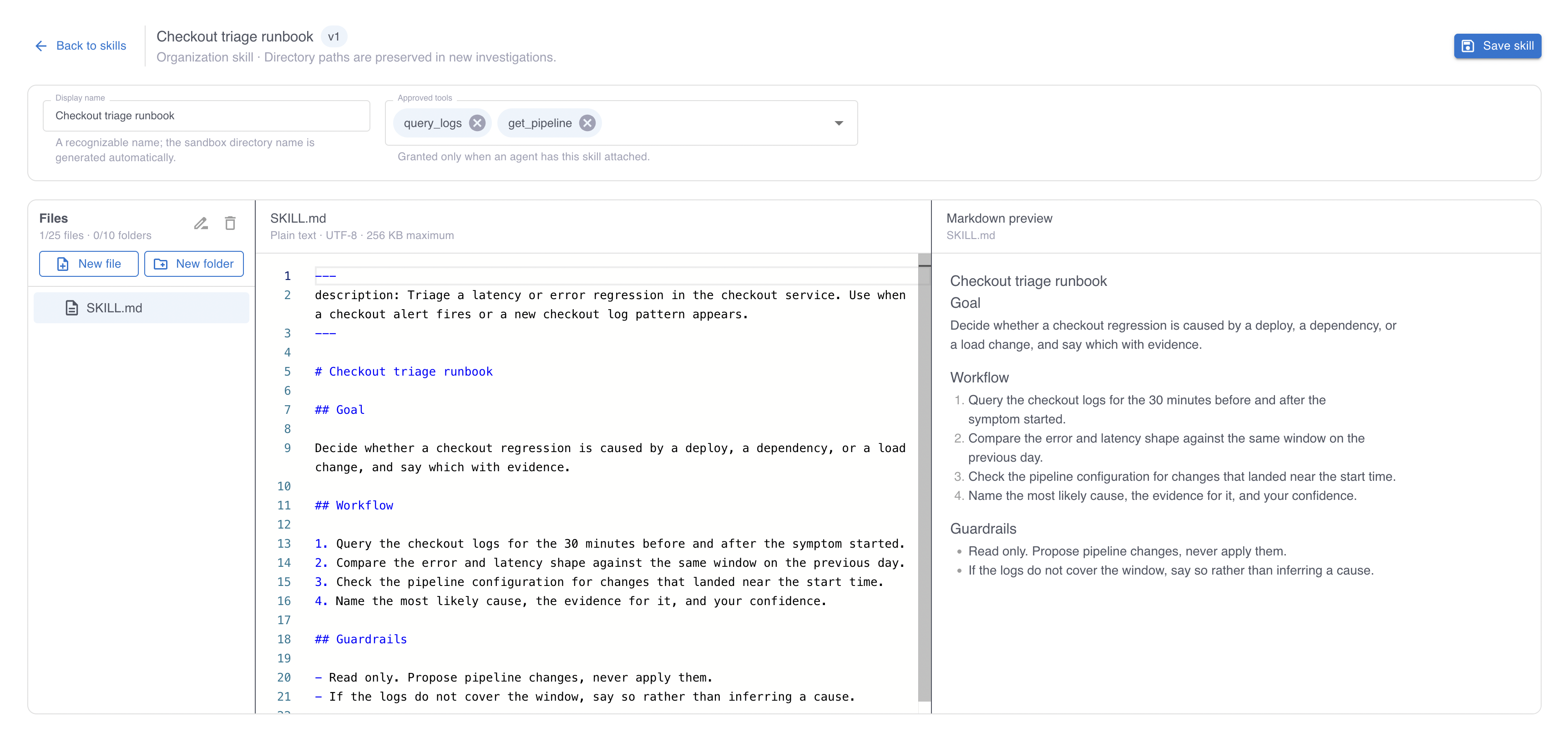
Organize a skill the way you would a short runbook. Keep SKILL.md to the approach and put long reference material, such as a table of service names or an example payload, in separate files the agent reads when it needs them.
What SKILL.md must contain
Every skill has a SKILL.md file at its root, and that file must begin with front matter containing a description:
---
description: How to respond to a checkout service latency alert - which dashboards to read, which dependencies to rule out, and when to page the on-call engineer. Use when a signal names the checkout service.
---

# Responding to checkout latency

...
The description is the only part of a skill an agent reads before deciding whether the skill is relevant, so write it to answer two questions: what the skill covers, and when to use it. A description that only names the topic leaves the agent guessing, while one that ends with a sentence starting “Use when” tells it exactly when to load the skill. The description can be up to 1,024 characters.
The body of SKILL.md is read after the agent loads the skill, so put the approach there.
Approve the tools a skill needs
The Approved tools field is what grants tools to an agent that enables this skill. Select only the tools the skill’s procedure actually uses.
In an organization skill, the Approved tools field is what grants access. An allowed-tools entry in the front matter of your SKILL.md does not grant anything, so a skill whose front matter lists tools but whose Approved tools field is empty grants nothing.
Each tool you approve grants its whole family to any agent that enables the skill, so approving a tool is a permission decision about the agent, not only about the skill. To keep the grant narrow, approve fewer tools. A skill that needs no tools at all grants none, and is safe to enable on any agent.
Enable a skill on an agent
Enable skills on the agent’s Capabilities step, where they are grouped into abilities, which carry tools, and reference skills, which carry only knowledge. To learn more, see Grant access to Grepr with tools and skills.
A skill takes effect on investigations that start after you save the agent.
Update a skill
Editing a skill replaces its whole directory, so the version you save is the version agents get. Grepr tracks a revision for each skill and refuses a save based on a revision that is no longer the latest, which stops one save overwriting another.
Every agent with the skill enabled picks up the new revision on its next investigation, so a change to a widely enabled skill reaches many agents at once. Change a shared skill the way you would change shared code.
Delete a skill
Grepr refuses to delete a skill that any active agent still has enabled. Remove it from each of those agents on their Capabilities step, then delete it.
Deleting an organization skill archives it, and investigations that already ran keep their transcripts unchanged.
An agent that loses a skill also loses the tools that skill granted, so before you remove a skill that carried tools, decide whether each agent still needs them and grant them another way if so. See Grant access to Grepr with tools and skills.
Limits
| Limit | Value |
|---|---|
| Files in one skill | 25 |
| Directories in one skill | 10 |
| Directory levels below the root | 3 |
| Characters in a file path | 240 |
| Size of one file | 256 KiB |
| Total size of one skill | 1 MiB |
| Characters in a description | 1,024 |
| Skills enabled on one agent | 20 |
| Total size of the skills enabled on one agent | 8 MiB |